# Godot  Health,
  HitBoxes,
  HurtBoxes, and
  HitScans
[](https://godotengine.org/download)
[](https://github.com/cluttered-code/godot-health-components/blob/main/addons/health_components/LICENSE)
[](https://github.com/cluttered-code/godot-health-hitbox-hurtbox/releases/latest)
[](https://github.com/cluttered-code/godot-health-hitbox-hurtbox/actions/workflows/ci.yml)
[](https://github.com/cluttered-code/godot-health-hitbox-hurtbox/releases)
[](https://cluttered-code.itch.io/godot-health-hitbox-hurtbox-hitscan)
[](https://ko-fi.com/clutteredcode)
> [!CAUTION]
> A lot changed in v5.0.0. It is recommended to update to v4.4.0 before going to v5.0.0 to avoid issues with component name changes. We're working hard to update the documentation.
> The components in the documentation are all now prefixed with "Basic". We added more complex variants to allow for multiple damage types and modifiers.
> Thank for the support!
## Documentation
Check out the [Wiki](https://github.com/cluttered-code/godot-health-hitbox-hurtbox/wiki) for Documentation and tutorials!
## Process and Data Flow
```mermaid
flowchart LR
HitBox
HitScan
HurtBox
Health
HitBox -- detect collision and send **amount** --> HurtBox
HitScan -- detect collision and send **amount** --> HurtBox
HurtBox -- send **amount** and **multiplier** --> Health
```
##  Health
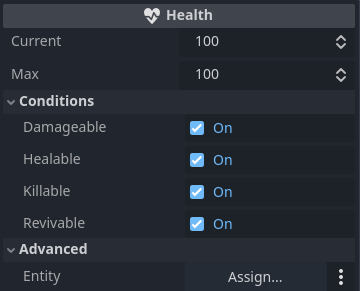
`Health` component tracks an entity's health and emits signals for various health realted changes.
##  Hurtbox 
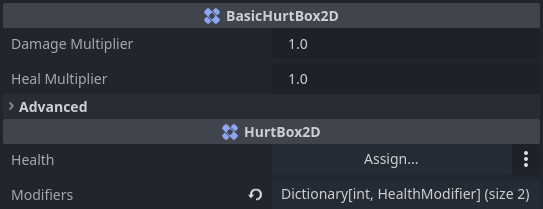
`HurtBox2D` and `HurtBox3D` components require a `Collision Shape` so it can be detected and is assigned a  `Health` component to apply damage and healing when hit.
##  Hitbox 
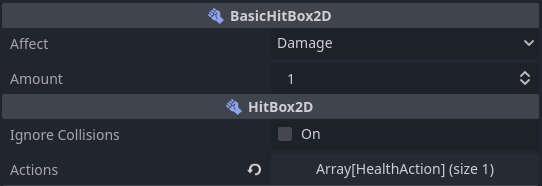
`HitBox2D` and `HitBox3D` components require a `Collision Shape` to detect collisions with a  `HurtBox2D` or  `HurtBox3D` to apply `DAMAGE` or `HEAL`.
##  HitScan 
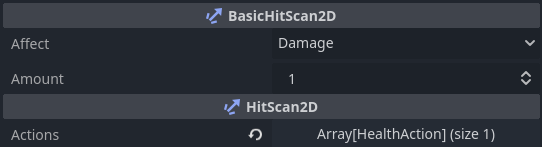
`HitScan2D` and `HitScan3D` components extend `RayCast2D` and `RayCast3D` to detect collisions with a  `HurtBox2D` or  `HurtBox3D` to apply `DAMAGE` or `HEAL`.
## Live Example Demonstration
[itch.io - godot-health-hitbox-hurtbox-hitscan](https://cluttered-code.itch.io/godot-health-hitbox-hurtbox-hitscan)
## Installation
### Asset Library Installation
1. Open the `AssetLib` tab in the Godot Editor.
2. Search for `Health`, `HitBox`, or `HurtBox` in the search bar.
3. Click the download button next to the Health, HitBoxes, and HurtBoxes plugin.
4. Once the installation is complete, go to `Project` -> `Project Settings` -> `Plugins`.
5. Find the `Health, HitBoxes, and HurtBoxes` plugin in the list and check the box to enable it.
## Usage

1. Add a `Health` node to a Node that needs health (ie. `CharacterBody2D` or `StaticBody3D`)
2. Add a `HurtBox2D` node with a `CollisionShape2D` to the same Node.
3. Set the `HurtBox2D` collision layer.
4. `HitBox2D` or `HitScan2D`
- Create a projectile or melee weapon with a `HitBox2D` and set the collision mask to the same layer as the `HurtBox2D` collision layer. This will automatically apply damage and healing.
- Create a gun with a `HitScan2D` extending from the barrel and set the collision mask to the same layer as the `HurtBox2D` collision layer. `fire()` needs to be called on the `HitScan2D` to apply damage and healing.
## Issues
Submit issues to the [Github Issues Page](https://github.com/cluttered-code/godot-health-hitbox-hurtbox/issues)
HitScans
[](https://godotengine.org/download)
[](https://github.com/cluttered-code/godot-health-components/blob/main/addons/health_components/LICENSE)
[](https://github.com/cluttered-code/godot-health-hitbox-hurtbox/releases/latest)
[](https://github.com/cluttered-code/godot-health-hitbox-hurtbox/actions/workflows/ci.yml)
[](https://github.com/cluttered-code/godot-health-hitbox-hurtbox/releases)
[](https://cluttered-code.itch.io/godot-health-hitbox-hurtbox-hitscan)
[](https://ko-fi.com/clutteredcode)
> [!CAUTION]
> A lot changed in v5.0.0. It is recommended to update to v4.4.0 before going to v5.0.0 to avoid issues with component name changes. We're working hard to update the documentation.
> The components in the documentation are all now prefixed with "Basic". We added more complex variants to allow for multiple damage types and modifiers.
> Thank for the support!
## Documentation
Check out the [Wiki](https://github.com/cluttered-code/godot-health-hitbox-hurtbox/wiki) for Documentation and tutorials!
## Process and Data Flow
```mermaid
flowchart LR
HitBox
HitScan
HurtBox
Health
HitBox -- detect collision and send **amount** --> HurtBox
HitScan -- detect collision and send **amount** --> HurtBox
HurtBox -- send **amount** and **multiplier** --> Health
```
##  Health
`Health` component tracks an entity's health and emits signals for various health realted changes.

##  Hurtbox 
`HurtBox2D` and `HurtBox3D` components require a `Collision Shape` so it can be detected and is assigned a  `Health` component to apply damage and healing when hit.

##  Hitbox 
`HitBox2D` and `HitBox3D` components require a `Collision Shape` to detect collisions with a  `HurtBox2D` or  `HurtBox3D` to apply `DAMAGE` or `HEAL`.

##  HitScan 
`HitScan2D` and `HitScan3D` components extend `RayCast2D` and `RayCast3D` to detect collisions with a  `HurtBox2D` or  `HurtBox3D` to apply `DAMAGE` or `HEAL`.

## Live Example Demonstration
[itch.io - godot-health-hitbox-hurtbox-hitscan](https://cluttered-code.itch.io/godot-health-hitbox-hurtbox-hitscan)
## Installation
### Asset Library Installation
1. Open the `AssetLib` tab in the Godot Editor.
2. Search for `Health`, `HitBox`, or `HurtBox` in the search bar.
3. Click the download button next to the Health, HitBoxes, and HurtBoxes plugin.
4. Once the installation is complete, go to `Project` -> `Project Settings` -> `Plugins`.
5. Find the `Health, HitBoxes, and HurtBoxes` plugin in the list and check the box to enable it.
## Usage

1. Add a `Health` node to a Node that needs health (ie. `CharacterBody2D` or `StaticBody3D`)
2. Add a `HurtBox2D` node with a `CollisionShape2D` to the same Node.
3. Set the `HurtBox2D` collision layer.
4. `HitBox2D` or `HitScan2D`
- Create a projectile or melee weapon with a `HitBox2D` and set the collision mask to the same layer as the `HurtBox2D` collision layer. This will automatically apply damage and healing.
- Create a gun with a `HitScan2D` extending from the barrel and set the collision mask to the same layer as the `HurtBox2D` collision layer. `fire()` needs to be called on the `HitScan2D` to apply damage and healing.
## Issues
Submit issues to the [Github Issues Page](https://github.com/cluttered-code/godot-health-hitbox-hurtbox/issues)