
1.9 KiB
SmartShape2D - FAQ
Why aren't my textures repeating?
Note
Starting with SS2D v3.3, edge textures will always be tiled regardless of the
repeatsetting.
If your textures aren't repeating and look something like this:

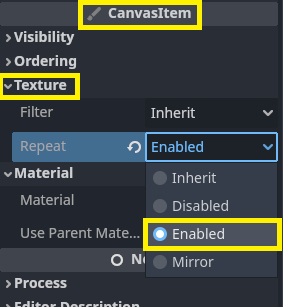
The issue is most likely that you forgot to enable texture repeat.
Why isn't my shape updating when I change the Light Mask?
There is no accessible signal when changing the Light Mask setting in editor, hence no update is triggered. The light mask will be correctly set on the next shape update.
If you need to tell the shape to update its rendering by code, call the set_as_dirty() or force_update method.
Why does changing the width look so ugly?
Changing the width of the quads generally looks best with welding turned off.
If welding is on, you can still change the width of the quads, but you may need to play with it a bit. It's best that you change the width gradually in small increments instead of sharply. Sharply changing the width will result in odd looking shapes.
Non-perspective rendering to a non-parallelogram is kinda tough
If anyone has any insights on this issue, please feel free to open an issue on this subject and let us know how we might be able to fix it
The shape is not rendered
Usually appears in combination with the following error message.
canvas_item_add_polygon: Invalid polygon data, triangulation failed
This error indicates there are inside-out parts, i.e. edges intersecting other edges. It is often caused by having two consecutive points at the same position.
When generating closed SmartShapes programmatically, make sure to call get_point_array().close_shape() and do not manually add the closing point.